Skip to content

Changelog

10 releases25 updates

  • June 2026: 1 release, 2 updates
  • July 2026: 5 releases, 13 updates
  • August 2026: 4 releases, 10 updates

What shipped, and what it was for

Every release, written for the person using it rather than the person who built it.

Jump to a release

Templates1 updateNew

Electro Jazz: a fourth template family

A moody single-page template with cinematic scroll motion, a lavender locations marquee, and late-night club energy.

Electro Jazz is the fourth full template family on Artistplus and the second single-page design. Everything lives in one scroll: a split-reveal hero, your latest records as vinyl-dark cover cards, a horizontal artist story, tour dates set in a vintage italic face, video cards from the road, and a booking form under a skyline-sized call to action. It ships on the free tier, and switching to it keeps everything you have already written and booked.
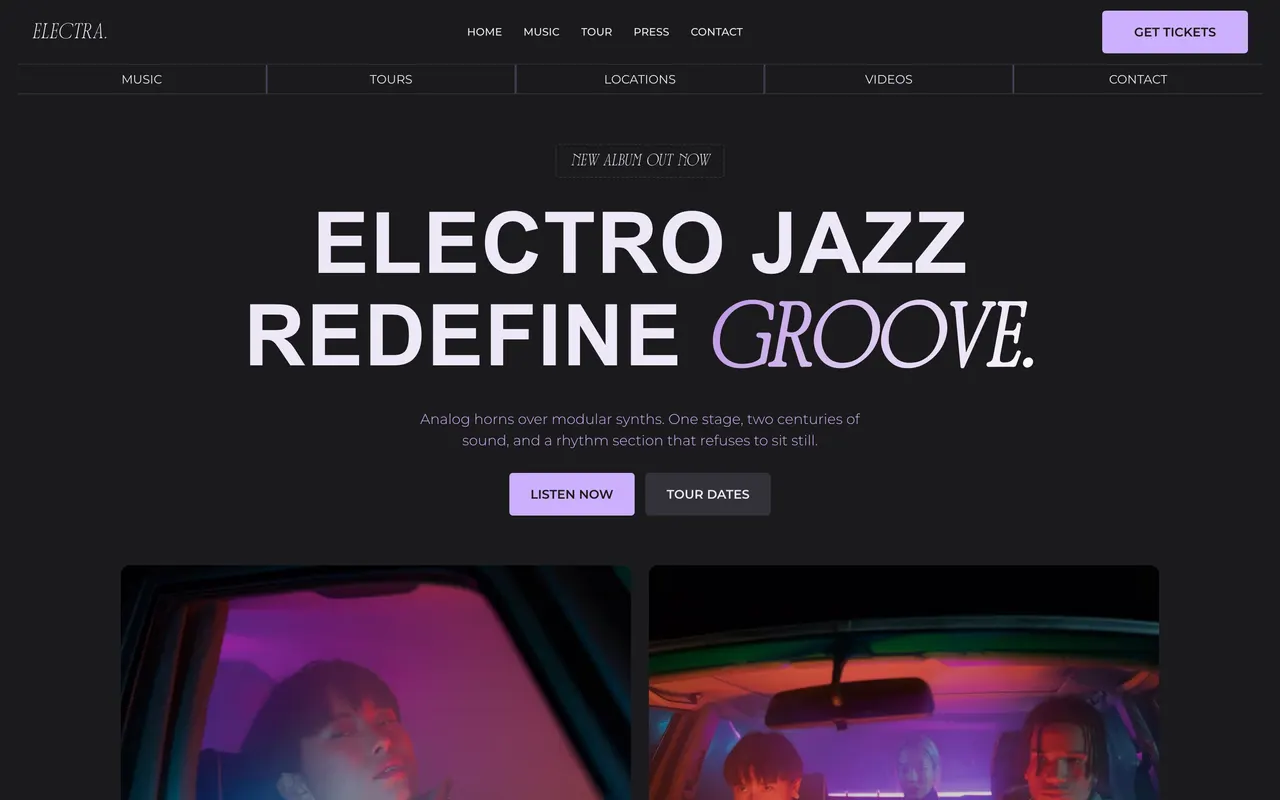
The Electro Jazz template homepage: a dark hero with giant uppercase type and a gradient italic accent word.
  1. One page, a whole night out

    The design language is purple haze on near-black: dashed label chips, hairline borders, and one italic display face doing the accents.

    • The hero title reveals line by line, and the nav strip tucks away as you scroll down and returns the moment you scroll up.
    • Release cards deepen on hover and play in a dock player styled to the family.
    • A lavender marquee band rolls your cities across the page on a twenty-second loop.
  2. The whole platform came along

    Catalog, tour dates, media library, newsletter, booking inbox, and the press kit all speak the design natively.

    • Your press kit and invoices render in Montserrat to match the site.
    • Every animation respects your visitor’s reduced-motion setting, and touch devices get the finished layout with no hover traps.
    • The template ships on the free tier as a single-page family.
Templates1 updateNew

Sonic Drive: a third template family

A monochrome, editorial multi-page template with a full-bleed hero, an outline marquee, and a gallery-grade release grid.

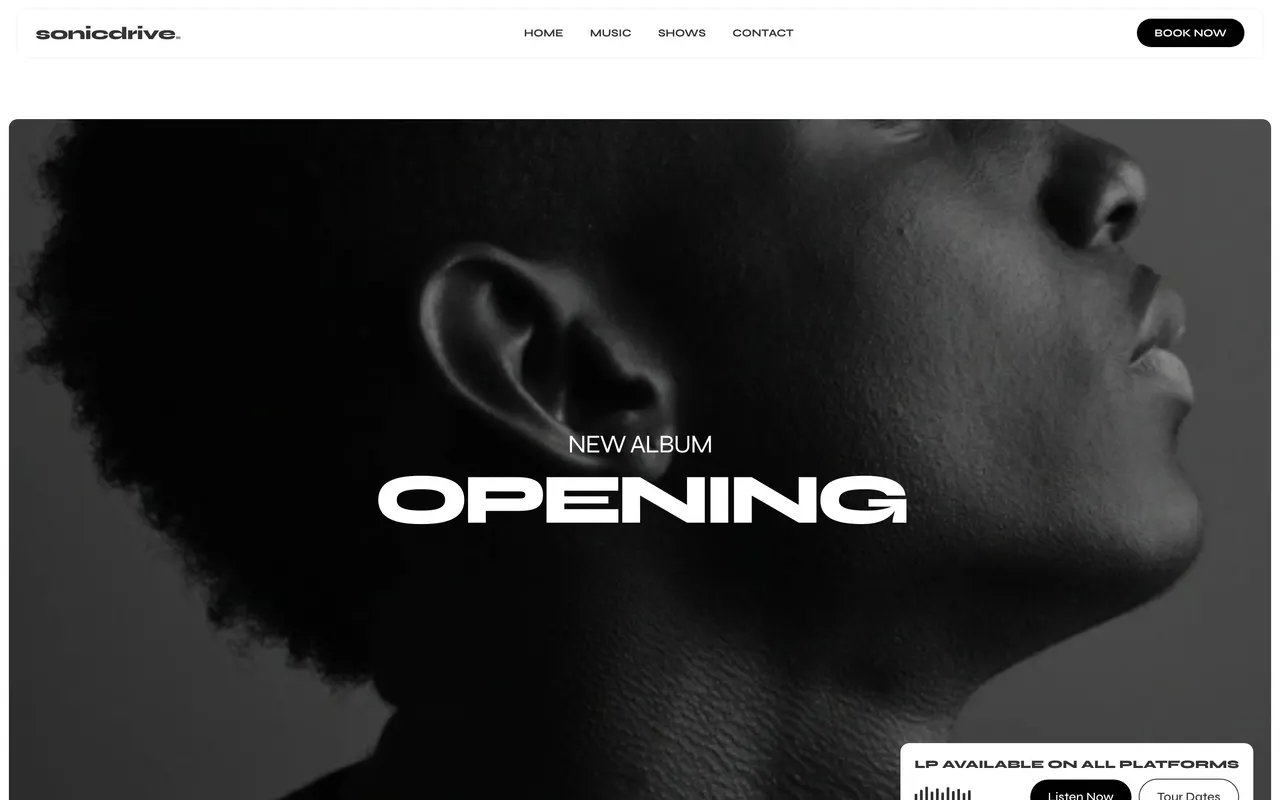
Every artist site carries the same content: releases, shows, photos, a way to get in touch. What changes is the design language wrapped around it. Sonic Drive is the third full template family on Artistplus, built for artists whose visual world is black, white, and photography. Switching to it keeps everything you have already written and booked, because pages map by what they mean, not by what they are called.

The Sonic Drive template homepage: a monochrome hero photo with a giant uppercase album title and a floating release card.
  1. Four pages in a monochrome language

    Home, music, shows, and contact, drawn in black and white with editorial type. A light and a dark palette ship with it, and both stay true to the design.

    • The home page stacks a full-bleed hero, an introduction band, a release mosaic, an outline marquee, a studio gallery, and your show list.
    • Shows sit in bordered date boxes that flood on hover, and rows link straight to your ticket seller.
    • The music page is a clean grid of square covers that grows with your catalog.
  2. The whole platform came along

    Sonic Drive is not a skin. The builder, your catalog, tour dates, media library, contact inbox, and the press kit all speak it natively.

    • Your press kit PDF renders in the same design as your site, in the Syne typeface.
    • Release pages get the family treatment: cover art beside the format, date, and streaming links.
    • Every animation respects your visitor’s reduced-motion setting.

Plans and pricing5 updatesNewImproved

New plans, a yearly price, and no handoff at checkout

Three paid plans replaced the old two, paying yearly costs 20 percent less, and upgrading now happens on a page inside your account.

Working out what Artistplus costs used to take longer than building a site with it. This release was about making the money side plain: what each plan includes, what a month costs on either cycle, and where the upgrade actually happens. Nobody should have to guess whether the tool they need is on their plan, and nobody should get handed to another company at the moment they decide to pay.

  1. Three plans, and 20 percent off for a year

    The old two plans became three, so there is a step between free and everything. Paying for a year costs 20 percent less on every one of them.

    • The plan page leads with the monthly price, so you always see what a month costs on either cycle.
    • Switching between monthly and yearly does not interrupt your site.
    • The free plan still does not expire.
  2. Upgrading happens without leaving Artistplus

    Checkout is a page inside your account now rather than a handoff to somebody else. Your card details still go straight to Stripe and never touch our servers.

    • Apple Pay, Google Pay and Link are offered wherever your browser supports them.
    • On a phone the payment fields come first and the subscribe button sits last, where your thumb is.
  3. Put another artist on, get a month back

    Share your link from the dashboard. They get half off their first month, and once they have stayed 30 days a month of credit lands on your account.

    • Nothing to claim and no code to type. The credit shows up in your billing settings.
    • The 30-day hold means the reward marks somebody staying, not somebody signing up.
  4. A page for every tool, with the limits that really apply

    Eight feature pages went live, one per tool, each with real screenshots. The plan limits printed on them are read from the same table the product enforces.

    • Website builder, domains and email, catalog, tour dates, vault, invoicing, press kit, and analytics.
    • What you read on a feature page is what your account will do.

Also in this release

  • Signing in and moving around the dashboard shows an Artistplus loading screen in your theme rather than a blank white page.
Compare the plans

Setup3 updatesNewImproved

Setup is four screens you can see from the start

Paste a link, confirm what we found, look at the site, and publish, with domain search inside the run and a quick start list waiting after it.

The old setup was a conversation, and a conversation hides how long it is. You could not tell from inside it whether you were nearly done or nearly starting. This release replaced it with four screens you can see the shape of from the first one, and it pulled two things that used to come later, choosing a domain and knowing what to do next, into the same run.

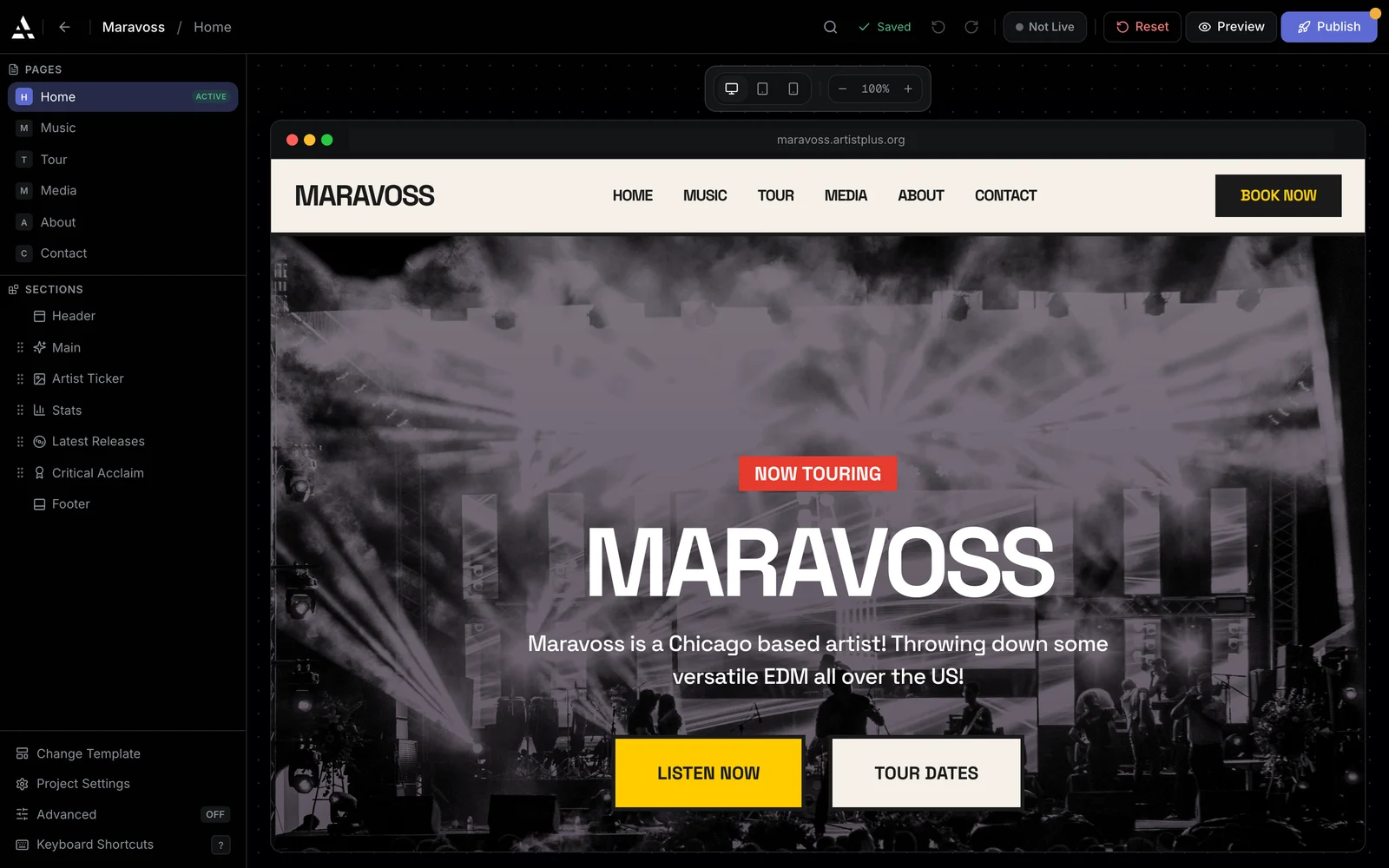
/builder
The Artistplus website editor: site pages and sections listed on the left, the artist's home page live on the canvas, and a Publish button.
  1. Four screens instead of a conversation

    Paste a link, confirm what we found, look at the site, and publish. The whole path is visible from the first screen.

    • Spotify, SoundCloud, or a social profile all work as the starting link.
    • Your releases, artwork, photos, and bio arrive from the accounts you connect.
    • Every screen is editable, so nothing is decided for you without a chance to change it.
  2. Choose your domain while you are still setting up

    Domain search moved into setup, so you can check whether yourband.com is free before your site is even finished.

    • What you find is carried through to checkout rather than started again later.
    • If nothing good is free, your Artistplus subdomain works from day one.
  3. A quick start list on your dashboard

    The overview page tells you what is left to do, in order, and each item opens the screen that does it.

    • Each item is a link to the screen that finishes it, not a description of one.
    • A short tour runs the first time you arrive.
How the builder works

Email and domains4 updatesNewImproved

Real email on the domain you own

Mailboxes on your own domain, replies that go out from that address, several addresses in one checkout, and transfers in both directions.

A booking address at a free webmail provider is the thing that makes a serious artist look like a hobby. Getting off one normally means a mail provider, DNS records typed by hand, and a second inbox nobody checks. This release put mailboxes on your own domain inside the dashboard, put the mail itself in Artistplus so there is no second inbox to forget, and made moving a domain in or out something you can do yourself.

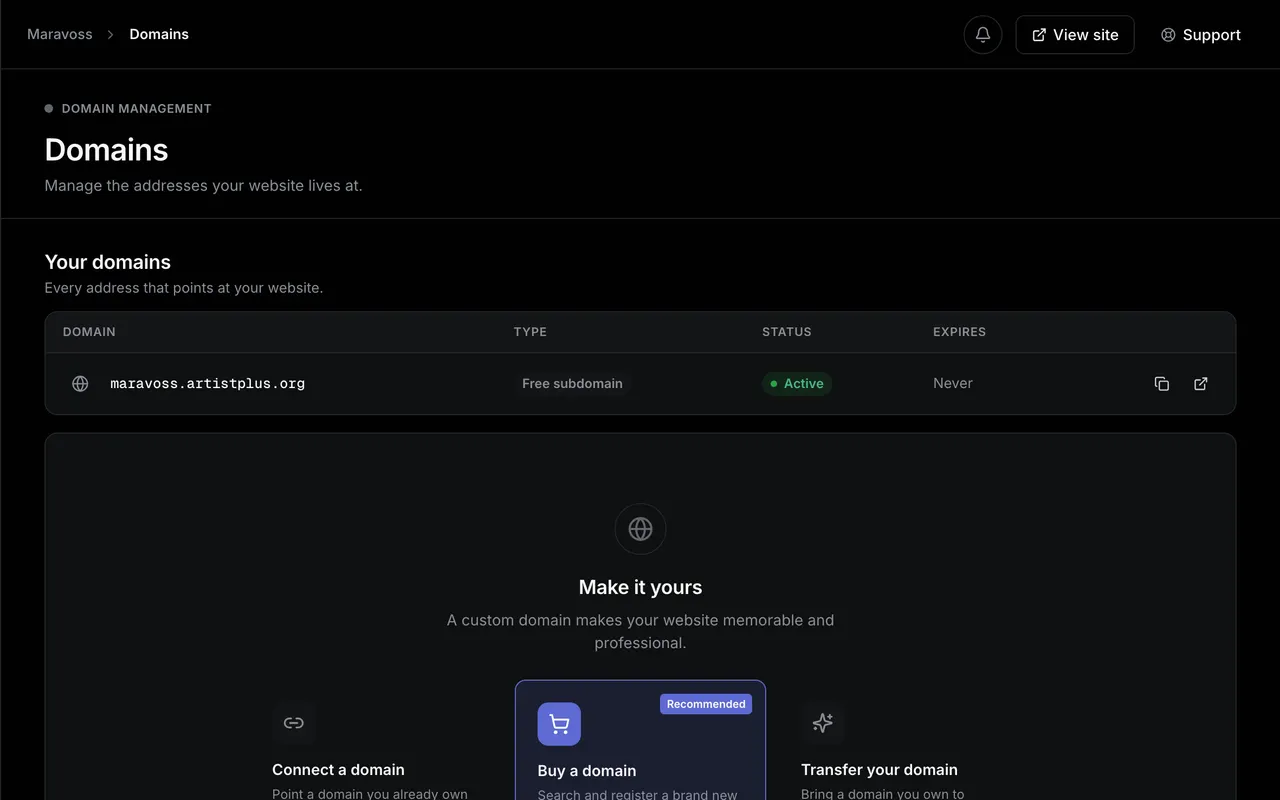
/domains
Domain management: the artist's free Artistplus subdomain marked active, above a panel offering connect, buy and transfer for a custom domain.
  1. Mailboxes on the domain you already own

    Real mailboxes on your own domain, set up from the dashboard. DNS records are written for you and webmail opens without a second password.

    • Setup instructions for Apple Mail, Gmail and Outlook are on the same page.
    • Existing mail records from another provider are merged rather than overwritten.
    • Claim booking@, press@ and hello@ together and pay once, rather than walking the same wizard three times.
  2. Reply from that address without leaving

    Mail sent to booking@yourband.com lands in Messages, and your reply goes out from that same address rather than a no-reply.

    • Conversations and account notifications are separate tabs, so a booking request never gets buried under a receipt.
    • Replies sync back over IMAP, so your phone mail app and Artistplus show the same thread.
  3. Move a domain in, or take it with you

    Transfer a domain you own into Artistplus, or transfer one out. Both are self-serve.

    • The page names what each step is waiting on, so a transfer that takes days does not look stuck.
    • Leaving is a page in your settings rather than a support ticket.
Domains and email

Invoicing2 updatesNewImproved

Invoicing, rebuilt around actually getting paid

A cleaner invoice, a tracked link instead of an attachment, your outstanding total at the top, and any show turned into an invoice in one click.

Chasing a fee is the least musical part of the job, and the old invoice made it worse by ending in a PDF attachment nobody could confirm had been opened. This release rebuilt the invoice around the part that matters, which is the money arriving. It also removed the retyping, because the venue, the date and the fee are already sitting on your tour page.

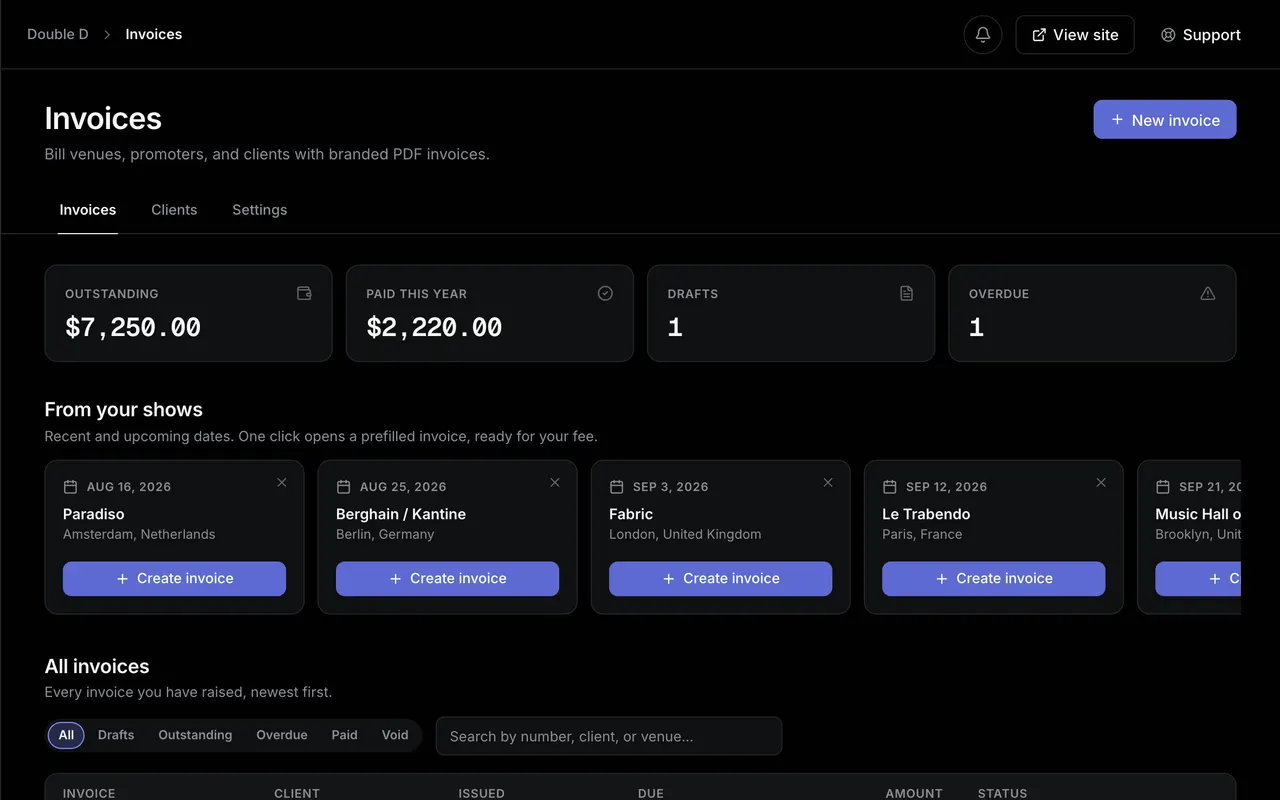
/invoices
The Invoices page: outstanding and paid totals, one-click invoices from upcoming shows, and a table of invoices by status.
  1. A tracked link instead of an attachment

    Invoices go out as a link you can watch rather than a file that disappears into an inbox.

    • What you are owed is the first thing on the page, not a total at the bottom of a list.
    • Each invoice records when its link was opened.
  2. Invoice a show from your tour page

    Any upcoming show becomes an invoice in one click, with the venue, the date, and the fee already filled in.

    • Nothing is retyped, so the invoice matches the booking.
    • You can still edit every line before it goes out.
How invoicing works

Vault3 updatesNewImproved

Every file in one place, including the ones you ask for

The vault takes any file type, sorts into folders, shares a whole selection at once, and can collect uploads from people who have no account.

Working files scatter. Stems in a cloud drive, photos on a phone, whatever the photographer sent last buried in an email thread. This release made the vault somewhere all of it can live, and then made it possible to get files out of other people without giving them an account.

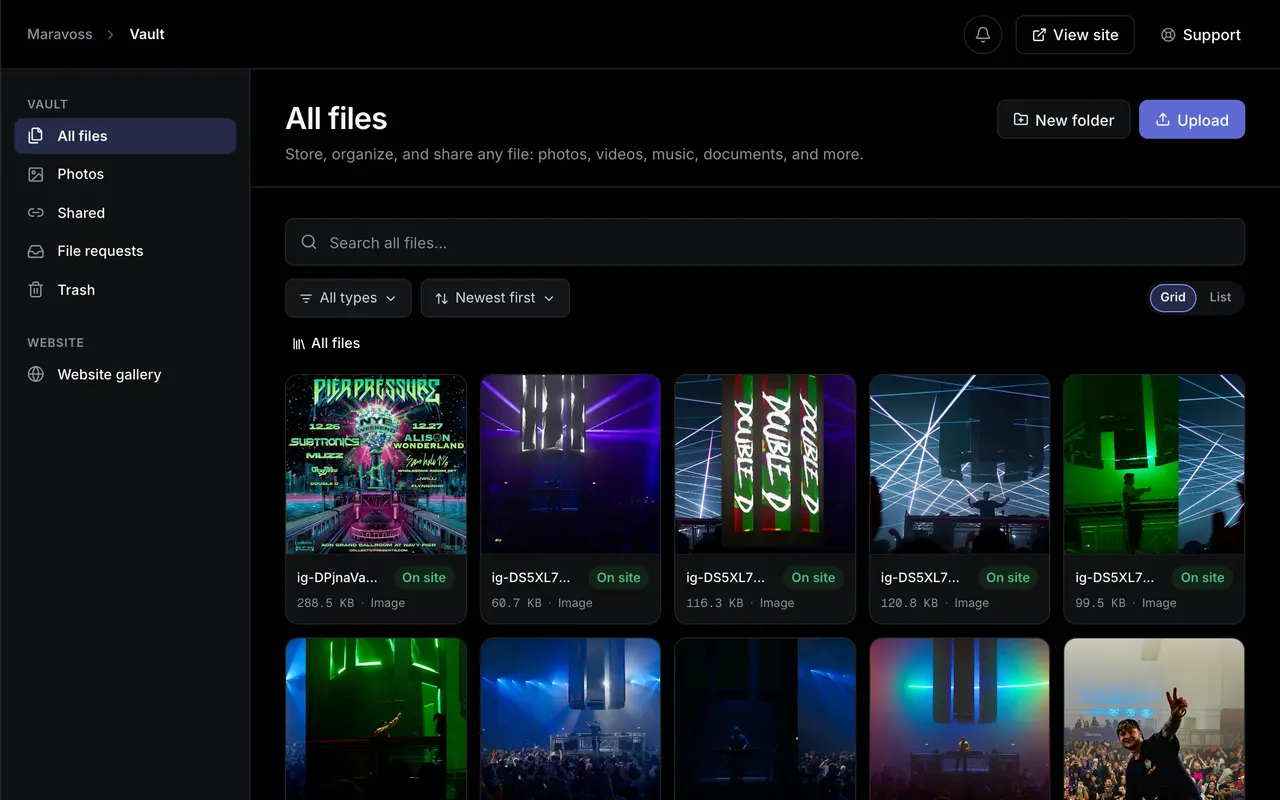
/vault
The Vault file library: a grid of uploaded photos, videos and artwork with per-file size, type and on-site status.
  1. Any file, not just media

    Stems, masters, contracts, riders, and artwork all live in the same place now. Only the files you choose ever appear on your website.

    • Uploading something to the vault does not publish it.
    • Your website gallery is a selection from the vault rather than a separate upload.
  2. Folders, bulk select, and one share action

    The vault got a folder tree, a selection mode, and one share action that covers everything you ticked.

    • Tick several files and send them as a single link.
    • A share can carry a password and an expiry date.
  3. Ask someone for a file without giving them an account

    Send a file request link to a photographer, a promoter, or a remixer. What they upload lands in your vault, in the folder you chose.

    • Links can be reused for a whole project or issued once per person.
    • You see who uploaded what, and when.
Inside the vault

Analytics1 updateNew

Analytics for the website you own

Visitors, page views, sessions, cities, and where your traffic came from, for your own site rather than for a platform that owns you.

Every platform an artist uses shows numbers about that platform. None of them tell you whether the link in your bio is doing anything, or which city is worth playing next. This release put analytics on the one property you actually own, and built it so reading them costs your visitors nothing.

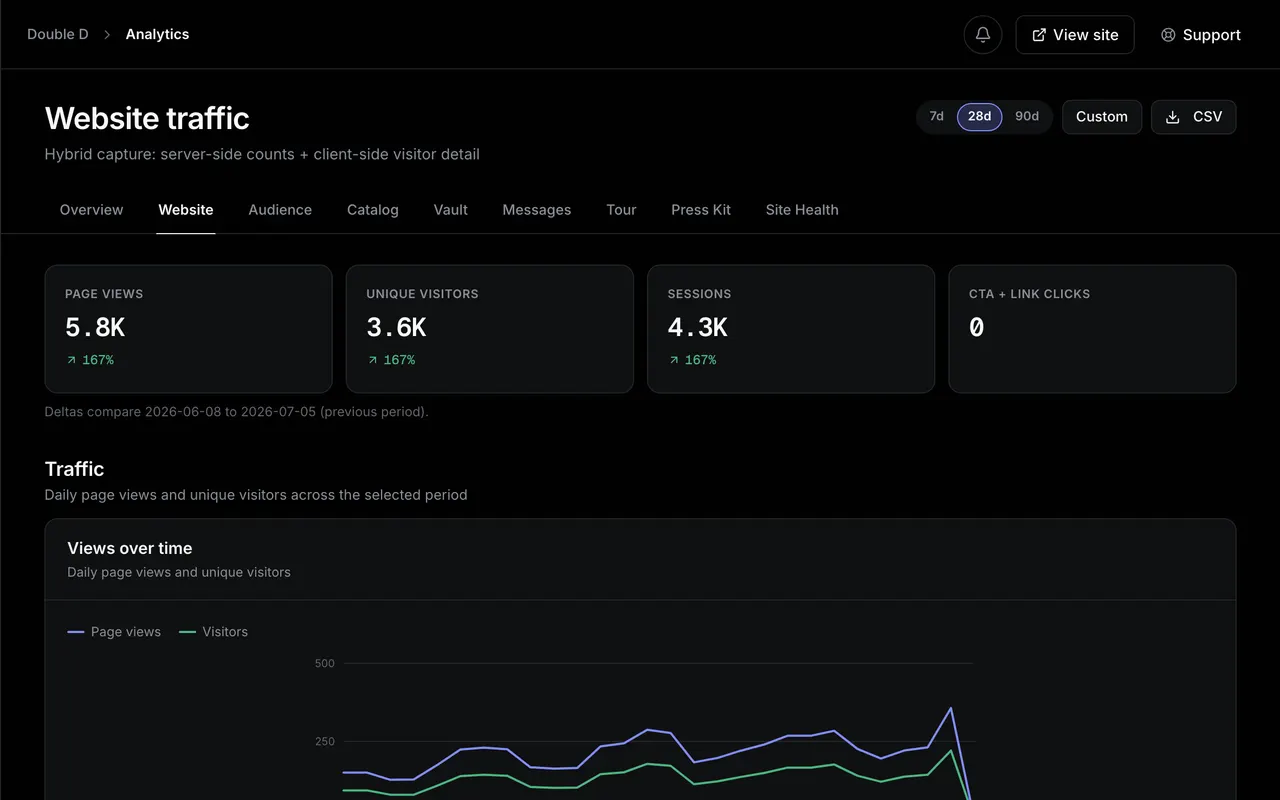
/analytics
Website traffic analytics: page views, unique visitors and sessions with a views-over-time chart across the selected period.
  1. Who arrived, and where from

    Visitors, page views, sessions, cities, and referrers, all for your own site.

    • You can see which of your links people actually use.
    • Cities and countries show where an audience is forming.
    • Traffic sources name the place a visit came from.
  2. Your pages stay fast

    Numbers are rolled up nightly, so a busy release week does not slow your site down.

    • Your site does not get slower as your traffic grows.
    • The dashboard reads a summary rather than counting every visit on load.
  3. Yours, and not for sale

    Nothing here is sold or shared. It is your audience.

    • The data belongs to your account.
    • No third party is fed your visitors in exchange for the feature.
What analytics shows

Catalog2 updatesNewImproved

Set it once and it keeps itself right

Connect Spotify or SoundCloud and your catalog stays current on its own, and one of your domains becomes the main address every link uses.

The first version of anything asks you to type everything in. The problem with that is not the typing, it is what happens months later when half of it is out of date and nobody has noticed. These two changes were the start of a rule we have kept since: anything Artistplus can find out on its own it should, and anything you tell it once should stay told.

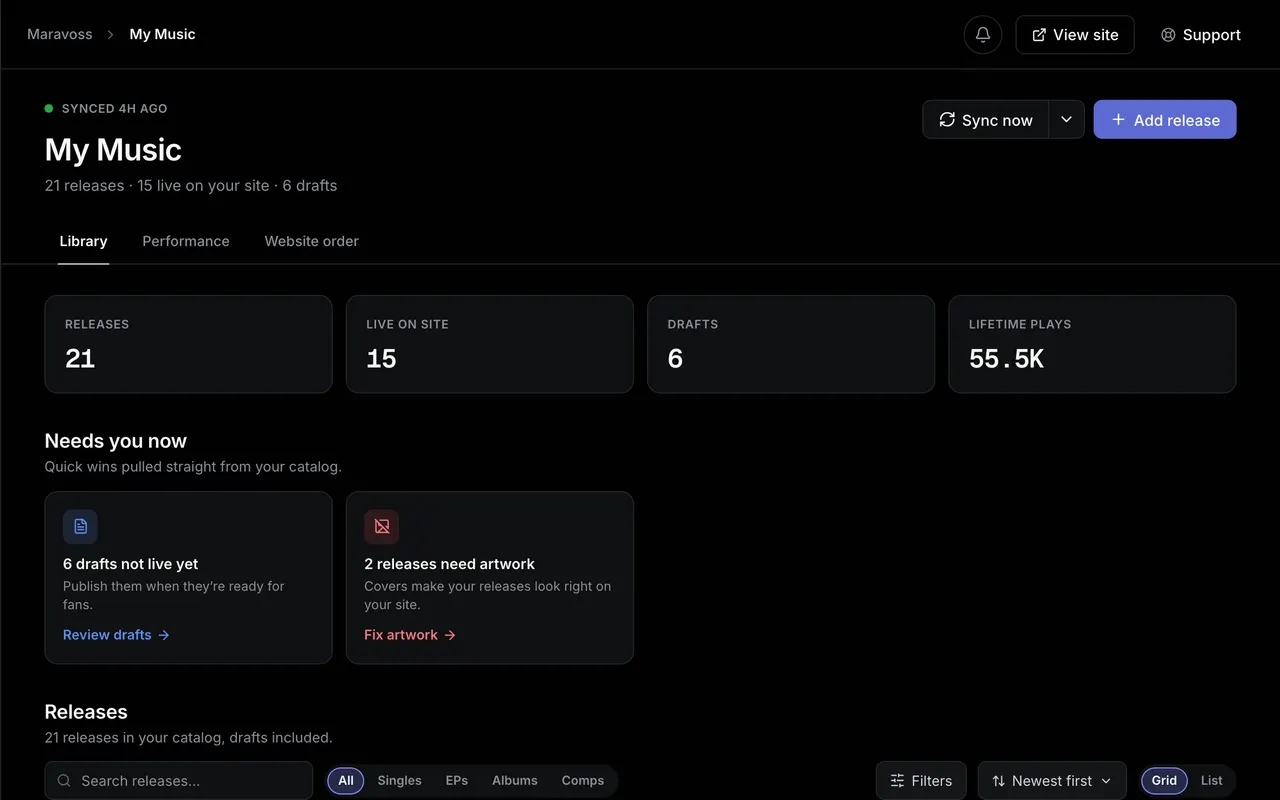
/catalog
The My Music catalog: release, live-on-site and lifetime-play counts above a grid of imported releases with their cover art.
  1. Your catalog keeps itself up to date

    Connect Spotify or SoundCloud once. New releases and uploads arrive on their own after that, with artwork and tracklists attached.

    • Releases come in with their artwork, tracklists, and dates.
    • A new upload shows up without you opening Artistplus.
    • You can still add, hide, or reorder anything by hand.
  2. Pick which address is your main one

    If you have more than one domain pointing at your site, you choose which one is canonical. Every share link and press kit uses it.

    • Your other domains keep working and point at the main one.
    • Changing your mind is one setting, not a rebuild.
How the catalog works

The fastest way to read a changelog is to be using the thing

Build a site on the free plan and the next release here will be about something you already have.